


Beat Party:Rhythm Dance Game
4.0187.00 Reviews
App Specs
- Version
- 2.4.9
- Updated On
- License
- Free
- Downloads
- 50,000+
- Developer
- LULUDEERS
- Categories
- Music
- Platform
- Android
Screenshots
 Analysis by AppCompare
I approach Beat Party En: Music Dance Game as a casual music game rather than a substitute for dancing in a room or learning choreography. Its appeal is the combination of rhythm play and a social, idol-themed setting: I can dip in for a quick music break, then spend longer shaping a character or seeing what other players are doing. That mix makes it easier to recommend to someone curious about dance games but unsure whether they want a demanding rhythm challenge.
Who will enjoy its particular mix
The game is a natural fit if you like music-led play with a light social layer and enjoy making a character feel like your own. It can also suit a first-time player who wants a gentle entry point: I would start with the introductory guidance, learn the basic actions at an unhurried pace, and treat early rounds as practice rather than a test of reflexes. The important distinction is that the dance is represented through game controls, so it is the rhythm and presentation—not physical movement—that make this a dance experience.
If you mainly want a focused score chase, a rhythm title built around precise note patterns may be a better match. If your priority is learning real steps, a dance-instruction app would serve that goal more directly. Beat Party sits between those expectations: its particular draw is putting music, an avatar, and player interaction in one place, not offering a workout or formal lessons.
What to expect when you first open it
Beat Party is a free music game from LULUDEERS, with an Everyone age rating. The game has a 4.1 average from around 610 ratings, and it has passed 50,000 installs. Those figures give a newcomer a sense of its audience, but they do not tell me whether its style will click with you; the best test is whether you enjoy the lively presentation and the balance between solo play and social features.
For the first session, I would keep the goal modest: understand how a round works, try a song or dance activity that catches your eye, and make sure the controls feel comfortable on your screen. That first small success is more useful than immediately trying to explore every menu. Once the basic rhythm feels familiar, avatar choices and the community side give you other reasons to return.
Getting set up without overthinking it
The current version is 2.4.7, and the game requires Android 5.1 or later. After installing, I would follow the opening guidance rather than tapping through it in a hurry. Tutorials are easy to dismiss when a game looks simple, but the few moments spent learning its gestures can prevent avoidable misses later. I would also take a moment to look through the available menus before spending time customizing anything, so I know where play, appearance, and social options sit.
Because the game combines individual play with multiplayer and chat, I would decide early how social I want the experience to be. A newcomer can first focus on learning the controls, then explore player interaction when ready. That order keeps the first session manageable and makes it easier to tell whether the music gameplay itself is enjoyable before social activity becomes part of the routine.
Worth Reading Before You Choose

Flipboard Shows What News Apps Must Do Beyond the Feed

Switching to Android Auto Means Rethinking Your Driving Routine

Google Calendar Makes a Crowded Week Easier to Manage

Ludo King Makes the Most of the Minutes Between Plans

Baby Panda World Brings Quick Play to Modern Phones, but Its Game Library Feels Busy

ESPN’s Live Game View Makes Following Close Games Easier
A first-session routine that actually helps
My practical approach would be to play one short session with the sound at a comfortable level, concentrate on the timing cues, and avoid changing several settings or appearance choices at once. If an action feels awkward, repeat the basic tutorial or try another round before assuming the whole game is too difficult. Rhythm games often feel unfamiliar for a few minutes because the player is learning both the beat and the screen’s visual language.
A useful everyday scenario is a short break between other tasks. I can open the game, complete a little music play, and leave the deeper customization or social browsing for a longer evening session. That separation helps: a quick round is for the immediate rhythm payoff, while choosing an outfit or checking in with other players is a different kind of activity. The game’s value is not only in extending a session but in offering more than one reason to return.
The Ultimate Dance Floor Experience
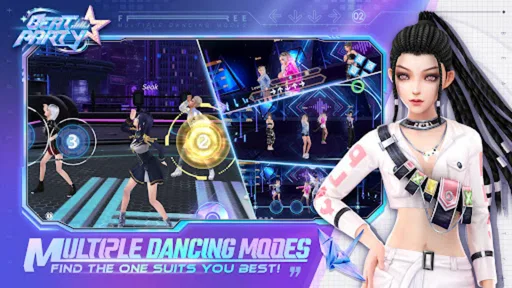
When I first opened Beat Party En: Music Dance Game, I was immediately struck by its vibrant and energetic interface. The colors pop, the graphics are smooth, and the overall vibe is just electric. It's like stepping into a digital dance fest! The game pairs perfectly with its wide range of music genres, from pop to electronic, ensuring there's something for everyone to groove to.
Easy to Get Started
One of the first things I appreciated was how easy it was to get started. You don't need to be a pro dancer to enjoy this game. The controls are intuitive, making it simple for anyone to pick up and play. Just tap, swipe, and dance along with the beat. It's as easy as pie! Plus, the tutorial at the beginning is super helpful, guiding you through the basics without overwhelming you.
That approachable start is useful, but I would not mistake it for instant mastery. My tip is to watch the screen as well as listen: the beat gives a broad sense of timing, while the on-screen prompts help translate that rhythm into a specific action. If I am struggling, I would focus on one gesture at a time instead of trying to react to everything at once. This makes the first successful round feel earned, rather than a lucky result.
Customize Your Dance Avatar
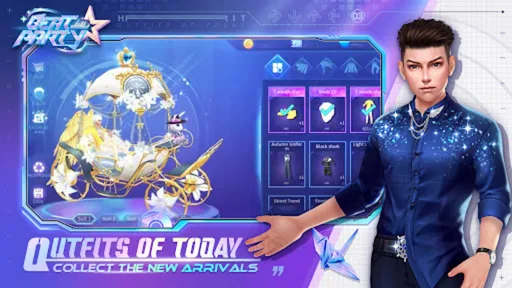
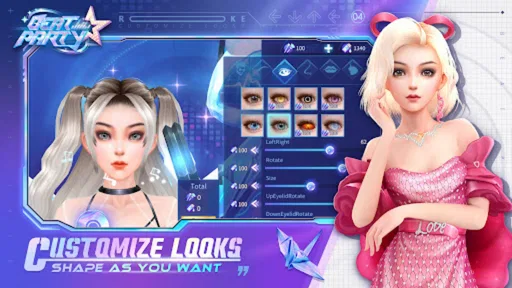
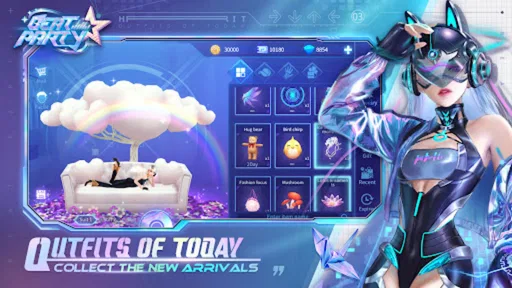
Who doesn't love a bit of customization? In Beat Party, you can create your own unique dance avatar. From their outfit to their dance moves, you get to decide how your character looks and grooves. I spent a good chunk of time just playing around with different styles and moves. It's a fun way to express your personality and stand out on the dance floor.
There is a small but useful trade-off here: customization can make the game feel personal, yet it can also absorb the time you meant to spend playing. I would make a basic look first, try a few rounds, and return to styling once I know which parts of the game I actually enjoy. That way, choosing an avatar is a reward for exploring rather than a long prelude that delays the music.
Multiplayer Mode – Dance with Friends
Now, dancing alone is fun, but dancing with friends? That's a whole new level of excitement. The multiplayer mode allows you to connect with friends or other players from around the world. You can challenge each other, compete in dance battles, or just hang out and dance together. It's a great way to socialize, especially if you're looking to meet new people who share your love for music and dance.
For a first visit to multiplayer, I would treat it as optional rather than the required next step. A solo session lets me learn the rhythm without worrying about keeping up socially; after that, joining a friend or exploring a group activity can give the same music play a more communal feel. If I prefer quiet, self-contained games, the social emphasis may be more distracting than appealing, and a single-player rhythm game would likely be a calmer choice.
Regular Updates and Events
One thing I've noticed about Beat Party En is how regularly it updates. New songs, dance moves, and events keep the game fresh and exciting. There's always something new to look forward to, which keeps the boredom at bay. Plus, participating in events can earn you some cool in-game rewards. Who doesn’t love a bit of friendly competition?
Events are best approached as a reason to explore, not as a deadline that dictates every session. I would first get comfortable with the normal play loop, then look at an event when its theme or activity appeals to me. That also helps me judge whether I enjoy the game on its everyday merits, rather than relying on limited-time excitement to carry the experience.
In-App Purchases and Ads
Now, let's talk about the elephant in the room – in-app purchases and ads. Yes, they exist, but they're not too intrusive. While you can enjoy most of the game for free, some special features and items require purchases. The ads are there, but they're not overwhelming. Personally, I didn't find them too bothersome, but it's something to keep in mind.
The game is free to download, while optional in-app purchases range from $0.99 to $99.99 per item. I would treat those purchases as extras, not a requirement for deciding whether the core experience suits me. If I am trying it for the first time, I would play before buying anything and set a clear spending limit, especially if the phone is shared with a younger player. That is a sensible precaution for any game with optional purchases, even one rated Everyone.
Community and Social Interaction
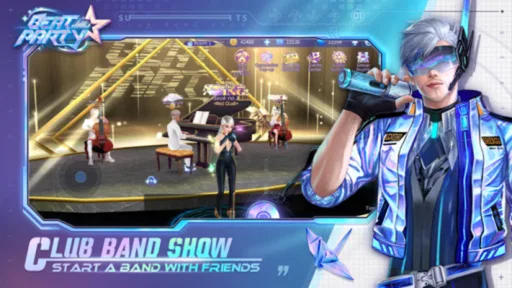
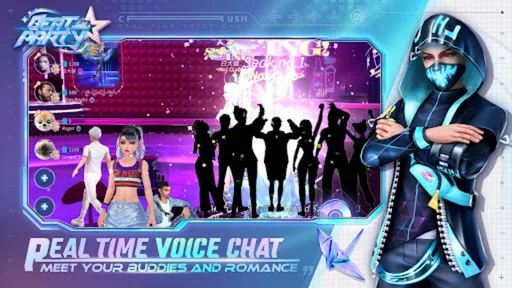
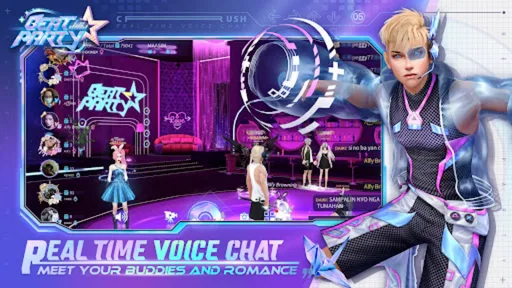
A big part of the appeal of Beat Party is its community. The in-game chat and social features allow you to interact with other players. You can join dance clubs, participate in group chats, and even send friend requests. It adds a social dimension to the game, making it more than just about dancing. It's about connecting with others who share your passion.
That social layer also changes what a good session looks like. Sometimes I may come for a quick round and leave; other times, the point may be checking in with a club or spending a while chatting. I would keep personal boundaries in mind in any open player community and share only what I am comfortable making visible. Someone who wants music play without conversation can simply prioritize the rhythm side, while a player who enjoys meeting others may find the community gives the game more staying power.
Choosing it over another music game
Compared with a conventional rhythm game, Beat Party gives more weight to avatar identity and meeting other players. That makes it a better pick when I want the music activity to feel like part of a social space. A score-focused game is the stronger alternative if I want tightly structured solo challenges and little menu browsing; a dance fitness app is more suitable if movement and exercise are the goal. This is a preference trade-off, not a flaw: Beat Party’s appeal is its blend, and the blend will not suit everyone.
It is also worth thinking about how you like to use your phone. If you often play in brief pauses, the game’s simple entry point is convenient. If you prefer an uninterrupted, carefully measured rhythm session, the customization and social options may feel like detours. I would choose a quiet moment for the first proper session, learn the controls, and then decide whether those extra layers make the experience more enjoyable or merely busier.
How to tell whether it is for you
After a few sessions, I would ask myself three practical questions: do I enjoy responding to the music, do I like having an avatar to shape, and does interacting with other players add something rather than interrupting me? If the answer is yes to the first two but not the third, I can keep my play focused on the rhythm and customization. If I mainly want competitive timing challenges, though, I would move on to a more score-centered music game instead of expecting this one to become something it is not.
There is no need to decide on the whole game during installation. I would use the opening tutorial, complete a round, and only then explore the social spaces or optional purchases. That sequence answers the most important first-time question—whether the basic play feels good—before I invest attention in its other systems. It is a low-pressure way to discover whether the upbeat presentation is enough to bring me back.
Overall, Beat Party En: Music Dance Game is a fantastic way to experience the joy of dancing right from your phone. Whether you're a seasoned dancer or just someone who loves music, this app offers a fun and engaging way to get your groove on. So, why not give it a try and hit the dance floor?
My recommendation after trying the different sides
I would recommend it to a friend who wants a colorful, social music game and enjoys tweaking an avatar as much as following a beat. I would be less likely to recommend it to someone who dislikes chat, wants a purely offline-feeling solo experience, or expects real dance instruction. The most reliable way to approach it is to begin free, learn the basic controls, and let the rhythm—not the promise of every menu or event—decide whether it earns a place on your phone.
Pros
- Engaging rhythm gameplay
- Vibrant graphics and animations
- Diverse music library
- Social features for interaction
- Customizable avatars
Cons
- In-app purchases can be pricey
- Occasional connectivity issues
- Ads interrupt gameplay
- Limited offline functionality
- Some songs locked behind paywall
FAQs for Beat Party:Rhythm Dance Game
What is Beat Party En: Music Dance Game?
Beat Party En: Music Dance Game is an interactive rhythm-based game that lets players step into a virtual dance floor. The game combines music, dance, and social interaction, allowing users to compete with friends or players worldwide. It offers a variety of music tracks and dance styles to explore.
How do I play Beat Party En: Music Dance Game?
To play Beat Party En, you need to tap on the screen following the rhythm of the music. The game presents a series of prompts that match the beat, and your accuracy in tapping these prompts determines your score. The better your timing, the higher your score.
Is Beat Party En: Music Dance Game free to download?
Yes, Beat Party En is free to download on both Android and iOS platforms. However, it offers in-app purchases that can enhance the gaming experience by unlocking additional features, songs, and customization options for your avatar and dance routines.
What are the system requirements for Beat Party En: Music Dance Game?
Beat Party En requires a stable internet connection to access its online features. For Android users, a device running Android 5.0 or higher is recommended. iOS users should have iOS 10.0 or later. It is also advisable to have sufficient storage space for a smooth gaming experience.
Can I play Beat Party En: Music Dance Game with friends?
Yes, Beat Party En offers multiplayer features that allow you to challenge and compete with friends in real-time. You can join dance battles, participate in events, and even chat with other players. This social aspect enhances the fun and competitive edge of the game.


